
Table des matières

Course Life Cycle: Course life cycle management tool: User guide
Introduction
This component organises a sequence of actions and conditions (triggers). Each time a sequence is run (via cron), the combination of conditions AND actions is played. The conditions select or exclude courses according to the chosen criterion
Access
Site administration/Plugins/Administration tools/Life cycle/Workflow configuration
Examples of conditions (triggers)
- A “permanent” trigger that systematically excludes the course with id 1 (system context), which corresponds to Moodle's standard home page.
- A trigger that selects all the courses whose start date is earlier than a certain delay.
- All the courses of category X
- All the courses whose start date is “xx/xx/xxxx”
The triggers follow one another and aggregate with each other (AND), so in this example we will have selected all the courses of category X whose start date is “xx/xx/xxxx”.
Examples of actions
At a point in the sequence (the workflow), for example after having chosen all the courses through the previous combination of conditions, you can set up an action such as:
- Mark the course “To archive”
- Trigger on 15 August
This archiving action will be subject to a condition to define, such as:
- Has no more active enrolled users in the course
- the course has had no student activity for X days
If you want to examine one OR the other of these conditions, and not aggregate them:
They will appear in two separate sequences (or workflows), each with one of the two conditions. So in this example we will have selected all the courses that have no more active enrolled users OR no student activity for X days.
In summary
- Within the same sequence the defined conditions aggregate (AND)
- If several sequences apply to the same course, the conditions exclude each other (OR)
Defining a workflow (a series of conditions and actions)
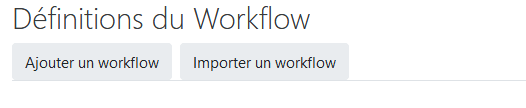
Click the back button to see the created workflow, and click the first control button to see its triggers and actions

Here is a workflow detail with two exclusions: course categories, and a specific course based on its ID
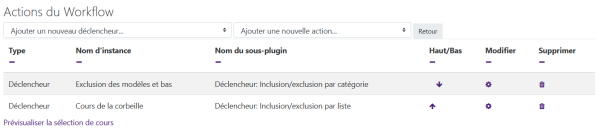
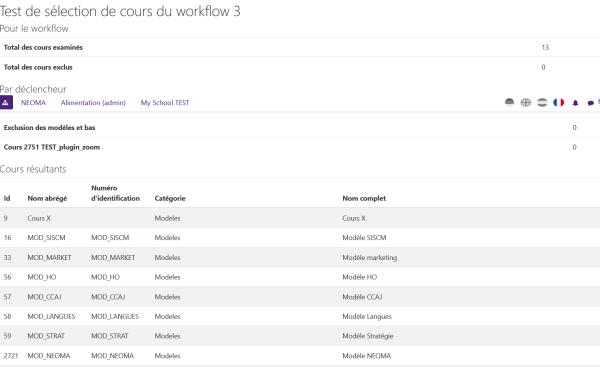
To check your sequence, click the “Preview course selection” link at the bottom of your sequence detail:
Note: course ID 2751 exclusion and totals missing
Credits
- Tobias Reischmann (University of Münster) - Author of the original plugin
- Valéry Frémaux (valery@activeprolearn.com) - additional developments
- Florence Labord (florence@activeprolearn.com) - documentation
Index du composant LifeCycle - index des composants - Back to catalogue index