
theme:klassplace:userguide:section5
Table des matières

Klassplace: General settings
Access: Site admin/appearance/themes/Klassplace > General settings submenu
Display settings
- Layout:
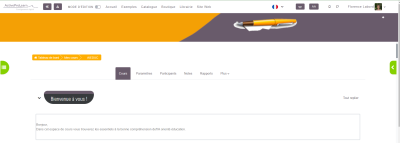
Choice 1 Full width header image
The content is placed after the banner, below it.
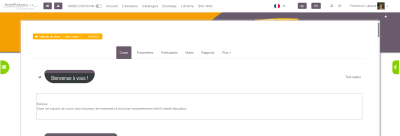
Choice 2 Centred content/header image as background
The content is over the banner.
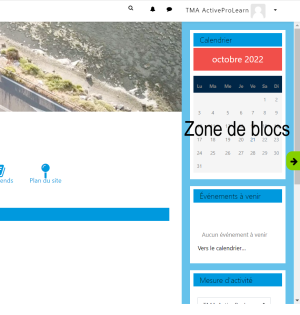
- Block area width: Width of the right menu, where blocks are placed. Visible in edit mode in courses.
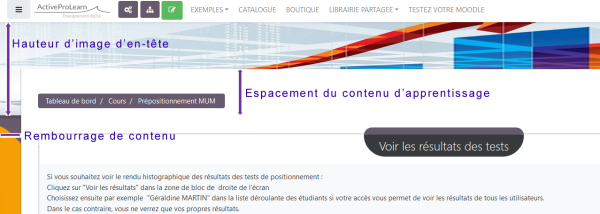
- Header image height: To choose the height of the banner image for courses and general spaces.
- Learning content vertical offset: Spacing between the top of the page and the content. Set a value lower than the height of the header banner image.
- Learning content spacing: Spacing between the top of the page and the course content. Generally, you want the value of this option to be lower than the height of the header image.
Example:
- Learning content vertical offset (from the top of the screen): 150px
- header image height (from the top of the screen): 200px
- Learning content horizontal padding: (for left/right spaces): 50px
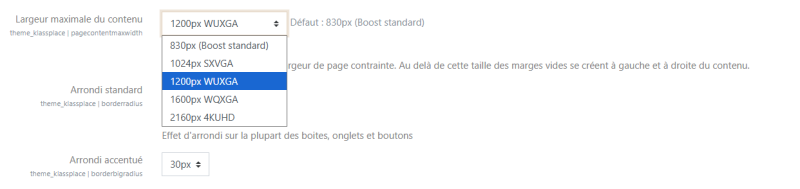
- Maximum content width: Adaptation to the general screen size of your organisation
- Standard rounding: Value in pixels to round menu buttons
- Accentuated rounding: List choice for a more pronounced rounding on some elements
Navigation drawer and horizontal menu
- Left navigation drawer (sandwich menu) Shows the left sandwich menu (nav-drawer) if checked.
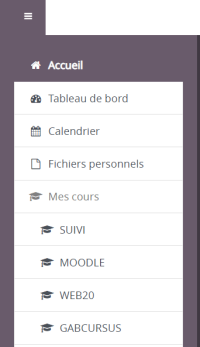
- State of the left navigation drawer (Sandwich menu) The drawer is closed for everyone by default if checked.
- Push the horizontal menu to the right: Places the custom menus of the top navigation bar (nav-bar) on the right or on the left. Note: custom menus are to be entered in Site administration/Appearance/Themes/Theme settings


- Language menu style: Choice of how language menus are displayed in the top navigation bar of your Moodle: icons, dropdown menu, dropdown menu and icons.
Credits
- Valéry Frémaux (valery@activeprolearn.com) - Code development and optimisation
- Florence Labord (florence@activeprolearn.com): Documentation and functional qualification
User guide index - Theme index - Back to plugins index - Back to the catalogue index
theme/klassplace/userguide/section5.txt · Dernière modification : de 127.0.0.1