
theme:klassplace:userguide:section10
Table des matières

Klassplace: A flat design theme: Login page
Login page content area
Concerns the login form
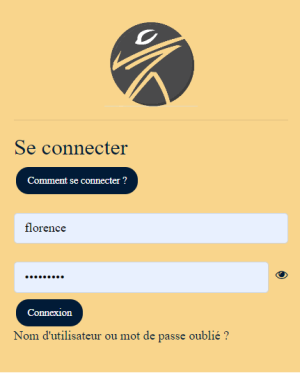
- “Show” button for the password: Shows/hides the password: This adds a switch to show the password in clear text in the login form.
- Login help button: Displays a button in the login form. Enter the text of the login help button here, for example: “How to log in”.
- Login help button URL: URL of the help for logging in.
- Login page banner image: image that will appear in the login form, generally a logo
- Login form colour: Background colour of the form.
- Login form text colour: Colour for the text.
Custom content
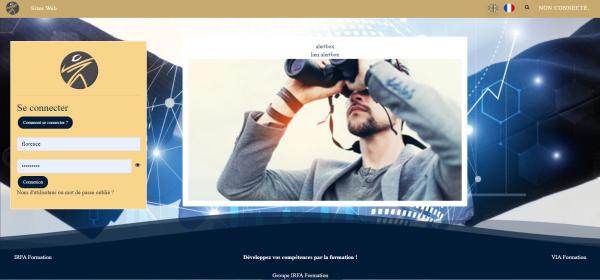
Display box to the right of the login box
- Alert box: Free text in the box.
- Alert link: Text for a link, below.
- Alert link URL - URL of the link, for example https://service.formation-enligne.com/
- Alert image: Image to display in this box.
- Alert image URL: Link on this image, identical to or different from the one on the text.
Credits
- Valéry Frémaux (valery@activeprolearn.com) - Development - Integration - Documentation
- Florence Labord (florence@activeprolearn.com): Documentation and functional tests
Theme index - User guide index - Back to plugins index - Back to the catalogue index
theme/klassplace/userguide/section10.txt · Dernière modification : de 127.0.0.1