
mod:mplayer:userguide
Table des matières

MPlayer Module - Media Player: User Guide
Publishing a video in a course
- Switch to edit mode
- Choose in the menu add a media player resource.
- Configure the form
- Save and return to the course
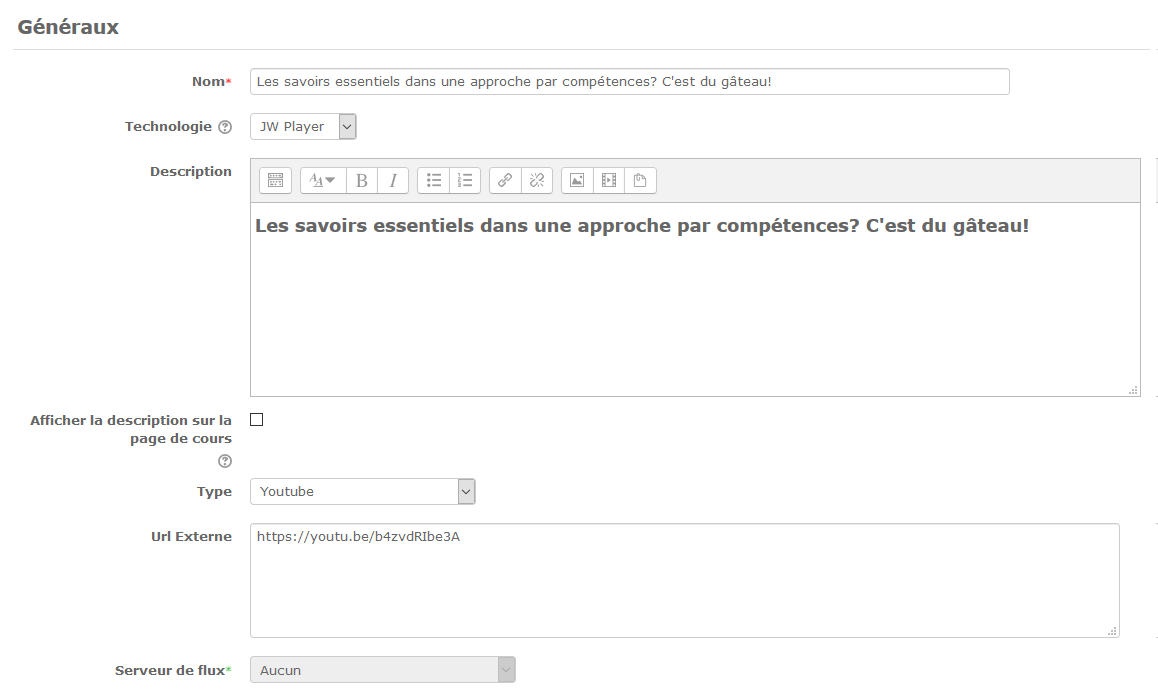
General
- Name: This is the name that will appear on the course page.
- Technology: JWPlayer or FlowPlayer
- Description: This is the description of the activity that will be displayed in the course, if the option is ticked
- Type: Choose in the drop-down list the media type; Depending on the type other options to specify are displayed
- Streaming server: Specify the streaming server if applicable
Technology
Depending on the technology you choose (JWPlayer or Flow player), the parameters to configure will vary. Here are the different parameters for each of the technologies.
Back to the component index - Back to the plugin index - Back to the catalog
mod/mplayer/userguide.txt · Dernière modification : de 127.0.0.1