
mod:customlabel:learningindicators
Table des matières

Course element: Satisfaction
Presentation
The Satisfaction content course element displays a donut showing the results of a Moodle questionnaire. It can be locally overridden in colours to match your editorial charter.
Added value
Automation of quality indicators, Qualiopi for example
Prerequisites
Existence of a questionnaire in Moodle (whose email sending can be tested)
Course element settings
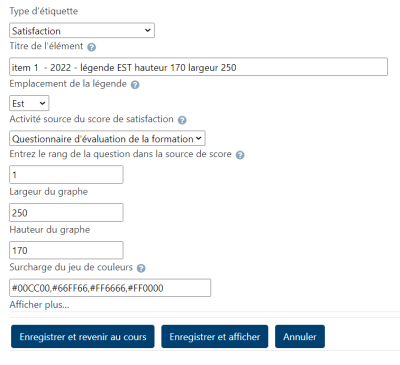
- - Label type: Choose “Satisfaction”
- - Element title: Free title, for example “Satisfaction indicator - 2022”
- - Legend position: Choice between North, South, East and West
- - Satisfaction score source activity: Select the questionnaire of your course
- - Enter the rank of the question in the source: Number of the question concerned: If your questionnaire has 4 questions, you will therefore have 4 satisfaction elements.
- - Graph width: In pixels, for example 650
- - Graph height: In pixels, for example 340
- - Colour set override: Hexadecimal colour codes separated by commas, 1 per answer.
Colour override example
- for 4 answer items to your question: Yes absolutely, Yes partly, No not quite, No not at all
- you would put 4 colour codes, each corresponding to a possible answer: #00CC00,#66FF66,#FF6666,#FF0000
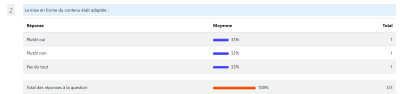
Rendering consistent with the questionnaire feedback
- Answers from all participants, question 1

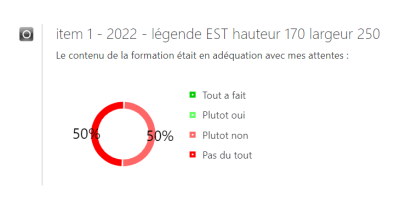
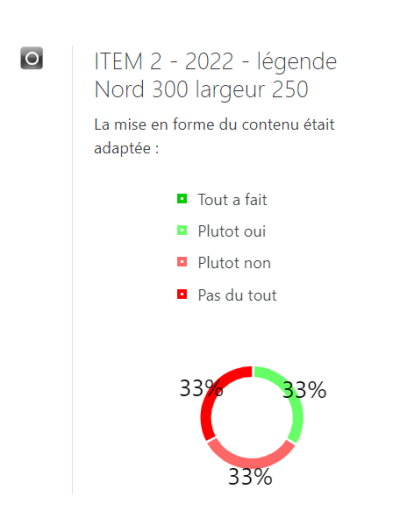
- Rendering of the course element on the course
Back to user guide & pedagogical guide - Back to the Course elements module index - Back to plugins index - Back to catalogue
mod/customlabel/learningindicators.txt · Dernière modification : (modification externe)