
Table des matières

MY Dashboard Page: Use Case 2
Introduction
The request:
- Allow teachers on the my page (Dashboard) to use course templates to quickly deploy courses in given course categories.
- Do not allow teachers to create or modify the proposed templates.
The answer: Use a widget of the local_my component and play on roles and permissions.
1/ MY page
Path: Site administration/Plugins/Local plugins/Enhanced My Moodle
The administrator adds the name of the widget to call for teachers: my_templates
On the MY page, the “my templates” widget appears
2/ Roles
No user who must not have access to the templates has a role in the courses that serve as templates
3/ Permissions
The course_creator role must be assigned on one (or several) course categories where the teacher can then deploy their courses based on the templates.
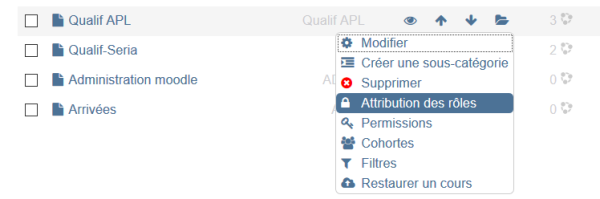
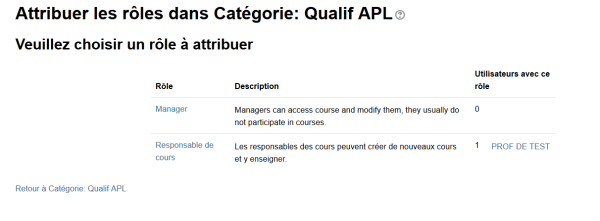
 Note: on image 2 the course_creator role has been renamed course manager
Rendering for a teacher
1/ The teacher clicks on “Create from a template”
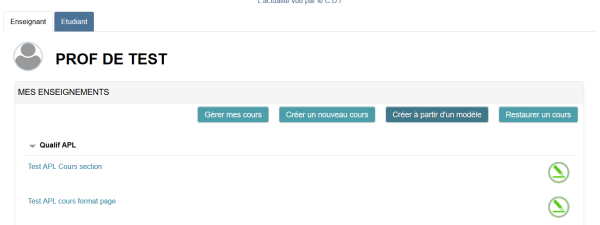
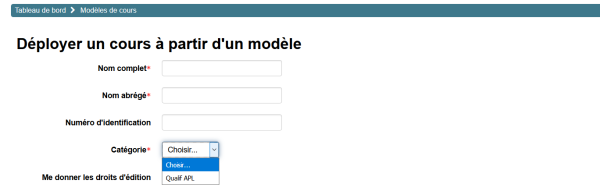
2/ They can create a course based on the templates available only in the category where they are course_creator
If they tick the “give me editing rights” box, they will have the teacher role in the created course.
See use case 1 - See use case 3 - See use case 4 - See use case 5 - See use case 6 - See use case 7 - -See use case 8 - Back to the user guide - Back to the component index - Back to the plugin index