
local:entinstaller:manualsync

User Guide: Moodle Feeding by ENTs: Manual Launch
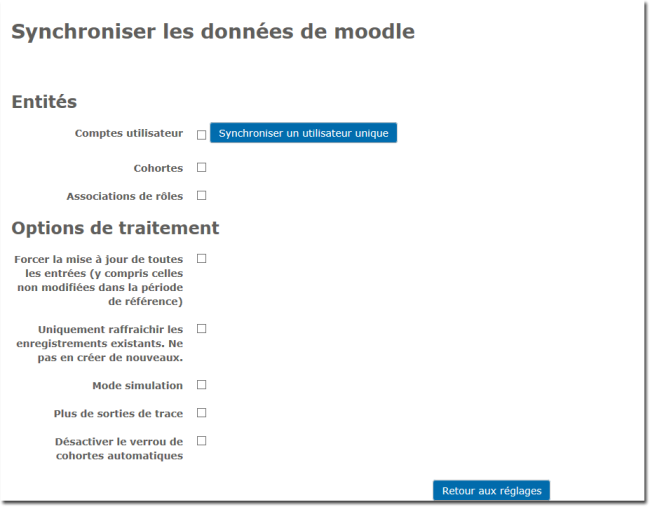
- User account: tick the box then click to synchronise an existing user whose data has changed in the LDAP.
- Cohorts: to synchronise a cohort (Requires a discriminator on a user group in an LDAP to know which ones to retrieve on Moodle)
- Role assignment Role assignment in the course or on Moodle (in a context) independently of enrolments. The context level must exist in the LDAP.
- Force update of all entries (including those not modified in the reference period): Launch a sync by re-examining all the LDAP data
- Only refresh existing records. Do not create new ones: Launch a sync by re-examining only the LDAP data already synchronised on Moodle.
- Simulation mode: Simulate the synchronisation.
- More trace output: Display more data in the trace window.
- Disable the automatic cohort lock: To be handled with care: Removes the prefix if there is an existing synchronisation prefix via the ent_installer component. In all cases will act as a differential on all cohort definitions.
Back to the user guide -Back to the component index - -Back to the plugin index
local/entinstaller/manualsync.txt · Dernière modification : de 127.0.0.1