
Table des matières

General Settings and Feeding Options
ENT Installer: Data Synchronisation by ENTs
Introduction
The general options address business options on the feeding methods that are independent of the LDAP mapping.
Active
Fully enables or disables the regular synchronisation of ENT data (CLI). If this setting is disabled, the synchronisation script will have no effect even if it is launched by cron.

Integration through cron DELETEME
Enables triggering of the sync by Moodle's cron task. This setting is deprecated pending the migration of the processing to Moodle “scheduled tasks”. Disable this option if you plan to schedule this processing yourself (CLI mode).
Processing time DELETEME
Trigger time in the cron. This setting is deprecated pending the migration of the processing to Moodle “scheduled tasks”.

Institution ID
In the case of a directory aggregating several distinct institutions, this setting provides the main filtering key of the feeding filters through a %ID% variable allowing a single institution to be extracted. The ENT use case generally uses the French National Education RNE.

Cohort prefix (vintage)
This setting defines the current prefix that will be added to the cohort identification number (IDNumber) when creating new cohorts. It also acts when deleting cohorts removed from LDAP, by protecting the cohorts that do not use the prefix.
Cohort sort prefix length
Value 5 by default. Adjusts the length on which the cohort sort extensions act in the cohort administrator interfaces (administration and teachers). In general, if a prefix begins with a vintage e.g. 2018_, the sort length will be adjusted to the vintage. Cohort sorting is done in two sort operations:
- A descending sort on the first prefix (of the length defined above)
- An ascending sort on the rest of the identifier
The aim here is to give users display priority to the current vintage.

Timestamp field
Gives the name of the LDAP field that timestamps the records. This field may vary depending on LDAP implementations and schema construction.

Directory date format
Two types of formats are supported, the Unix format of openLDAP and the ActiveDirectory format.

Time offset
A time offset in seconds, if the directory's time base is not the same as the Moodle server's time.

Effective authentication method
The real authentication method that will be applied to accounts created by the ENT Installer. The ENT Installer will always use the configuration of the 'auth/ldap' plugin, even if another authentication method is actually used for login. Possible choices in the list: Manual accounts, No login, Email-based self-registration, MNet authentication.

Initial visibility of email addresses
The initial visibility of email addresses for newly created users.

Domain of auto-generated emails
When the users to create have no email address, the ENT Installer generates a fake email address to stay compliant with Moodle's management rules. The domain on which these addresses are created can be chosen here.

Build the teacher category
If active, then any user recognised as a teacher by the feeding of their SDET-compatible profile will be assigned a course category in their name in which they will be named Manager, with the right to freely create subcategories and courses.
Protected categories
When feeding pre-existing Moodle instances, an additional function for bringing back teachers' courses makes it possible to relocate all the courses of which an identified teacher is the only Editing Teacher in their teacher category. There may be justified exceptions, if the teacher edits volumes located in other branches of cross-cutting categories. You can list here the numeric ids of the categories that must be ignored during the repatriation analysis.
Note that this feature is available at all times, and can also be used for a “post-hoc tidy-up” of the platform after a certain period of use.
Teacher spaces container
Designates the super-category where the teacher categories will be created.
Hide teachers' first names
At the request of certain education authorities, and notably in the environment of lower secondary schools, it is possible to reduce first names to initials in the teachers' own categories.

Update the institution structure
 Not implemented
This feature provides for the possibility of scanning the institution's SDET structure data to build and synchronise a category tree based on the class structure.

Create the site cohort of students
Based on recognition of the student status, it is possible to request the creation of a global cohort with all the students fed in. This creation is carried out independently of the cohort synchronisation sub-service.
Student cohort name
The name of the global student cohort can be specified here.

Create the site cohort of teachers
Based on recognition of the teacher status, it is possible to request the creation of a global cohort with all the teachers fed in. This creation is carried out independently of the cohort synchronisation sub-service.
Teacher cohort name
The name of the global teacher cohort can be specified here.

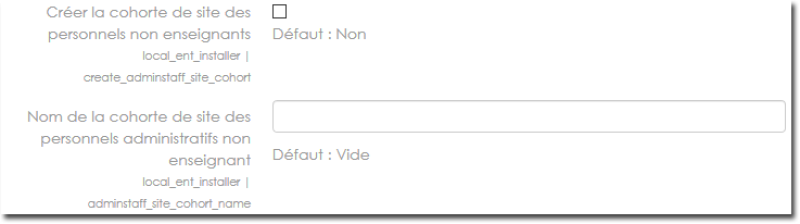
Create the site cohort of non-teaching staff
Based on recognition of the non-teaching staff status (everything excluding students and teaching staff), it is possible to request the creation of a global cohort with all the non-teaching users. This creation is carried out independently of the cohort synchronisation sub-service.
Name of the non-teaching administrative staff cohort
The name of the global non-teaching staff cohort can be specified here.
Site administrators cohort name
The name of the global site administrators cohort can be specified here. This cohort is SYSTEMATICALLY created with all the people designated as site administrators by the feeding rules. A later manual assignment of a site administration status does not update this cohort automatically, but manual appointments of administrators will be kept during a re-feed.

Create cohorts from user records
This feature relies on the SDET definitions and extracts the class code to feed the class cohorts in secondary education institutions in the ENT context. In cases of application to non-SDET directories, the cohort synchronisation sub-service will be used to synchronise the enrolment groups.

Appoint headteachers
Based on SDET recognition of the Head of institution status, a General Manager role can be automatically assigned to these users during feeding.
Initial categories
This setting lets you define a set of categories that must be guaranteed in Moodle at platform start-up (and permanently), to serve a pedagogical model or the operation of certain plugins.
see the article Injecting the Initial Categories for the details of the category syntax.

Other screens: see the user guide
Back to the component index - Back to the technical guide index - Back to the component index- Back to the plugin index- Back to the catalog