
blocks:profilespecifichtml:userguide
Table des matières

Profile Specific HTML Block (HTML content specific to a profile value): User guide
This block displays short HTML content depending on values found in the user profile. It performs a boolean test on a single value, on two combinable fields.
Using the block
- Switch to edit mode
- Place the block on a course page or on the dashboard (MY) page, for example
- Configure the block
Block configuration
- Visible block title: the title chosen for the block
- Field 1: Choice of the first profile value
- Operation: Choice of the boolean OR or AND (optional)
- Field 2: Choice of the second profile value (optional)
- Content for all: Content displayed to all profiles
- Content if matching: Content displayed if the condition is met
- Content if not matching: Content displayed if the condition is not met
Possible profile values (Last update 31/03/2017)
- Institution
- Department
- Your registration has been confirmed
- City
- Country
- Email
- Access to platform X (MNet network circulation)
Examples
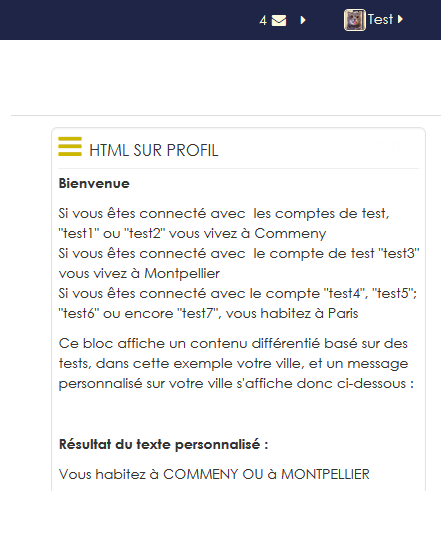
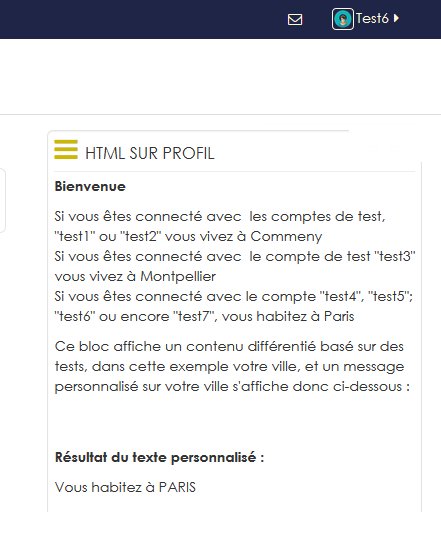
Displaying a message on the city
 |  |
Credits
- Valéry Frémaux (valery@activeprolearn.com) - Development and tests
- Florence Labord (florence@activeprolearn.com): Documentation
Back to the Profile Specific HTML block index (HTML content specific to a profile value) - Back to the plugins index - Back to the catalogue
blocks/profilespecifichtml/userguide.txt · Dernière modification : de 127.0.0.1