
blocks:datacart:userguide
Table des matières

Datacart block/CV basket: User guide
Introduction
This block lets users retrieve, globally or individually, the CVs deposited in the CV library. It can retrieve them anonymised or not.
Implementation
Drop a CV basket block in your course
- Switch to Edit mode
- Add a block/CV basket
- Click the gear wheel to access the block configuration
- Block title: Title of your choice
- Document generator choice: Name of the PDcertificate instance in the course
- Sensitive data fields: Names of the form fields you want to anonymise, separated by commas.
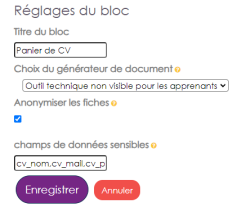
Example: cv_nom,cv_mail,cv_prenom,cv_linkedin,purple_entreprise_mail
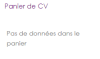
- Once your settings are saved, the block displays empty.
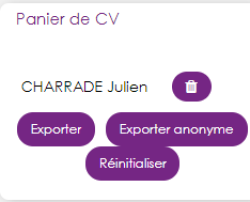
- As users make submissions, the documents available for download are displayed in the block.
Downloading the CV documents
- Click the assignments to download as a ZIP file.

- The export is done in two possible modes: anonymised CVs or not.
- In the folder of an anonymous CV, a TXT file indicates who it is, to ease a mapping with the non-anonymous CVs. Example: VTVZT YWUXWUWY : Julien DUPONT

Credits
- 2017 Valéry Frémaux (valery@activeprolearn.com) - Design, coding
- 2017 Florence Labord (florence@activeprolearn.com) - tests, functional review - Documentation
Back to the component index - Back to plugins index - Back to catalogue
blocks/datacart/userguide.txt · Dernière modification : (modification externe)