
Table des matières
Dashboard Block
Filters and Summers
Filters and summers are features related to the query result. The data useful for displaying tables and graphs can be filtered according to certain columns.
Filters
Filters offer the dashboard user a way to extract a partial result of the complete query, from columns designated as filtering dimensions.
A particular value of a filter is called a “modality” of the filter.
As they are based on the actual results of the unfiltered query, filters can only offer modalities that exist in the data.
It is possible to define several filters that will combine in an “AND” operation. (*).
Each filter definition results in the addition of a filtering form field above the data table (or the graph).
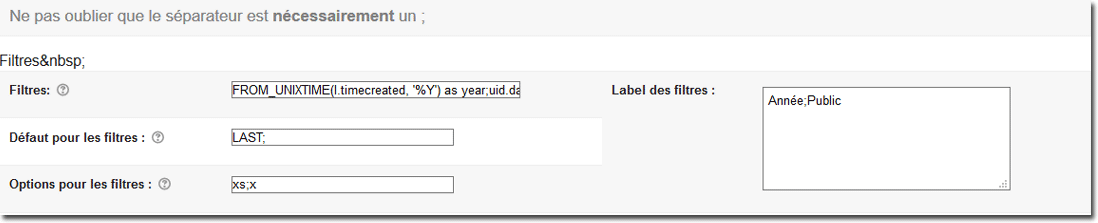
Filter definitions
This field must be filled in with a list of field definitions from the original query. This field accepts a semicolon-separated list to successively define several filters to present in the interface.
A filter definition:
- Dynamically modifies the query when the block is produced.
- Automatically adds the criteria drop-down lists that let the user apply the filter.
 Warning, the definition must be complete, with the column alias mentioned. So for a query:
 SELECT
    username as un,
    firstname as fn,
    lastname as ln,
    country as cn
FROM
    {user}
Then the admissible filter expressions are:
username as un
or
country as cn
Several filters can be defined by separating their definitions with semicolons.
Filter defaults
In some operating modes, it is necessary to indicate a default value for the filter. This value can be one of the normally expected values, or one of the following metamarkers:
- FIRST: Will take as default the first available value of the filter modalities
- LAST: Will take as default the last available value of the filter modalities
Filter options
Some options can strongly influence the presentation and operation of the filter.
Single selection (s)
If this option is enabled, the filter cannot operate on the whole set of results. A modality will necessarily apply to the filter. If this modality cannot be determined, then the FIRST modality will be applied.
This setting is necessary when the result is potentially very large and would lead to a very costly query and display.
Multiple selection (m)
If this option is used, then it will be possible to activate several modalities of the filter simultaneously (multiple selection list). This option is incompatible with the previous one.
Global filter (g)
If this option is enabled, then the filter is marked as global. If several dashboard elements are present in the same display page, then all global filters set on the same field definition will be synchronised on the same modality.
Disable post-formatting (x)
Some query writing styles (**) may cause a problem for the filter query post-formatter. If so, using this option can help solve the problem.
Summers
Summers let you directly express, on the dashboard display, aggregations of values (sums) from the result data.
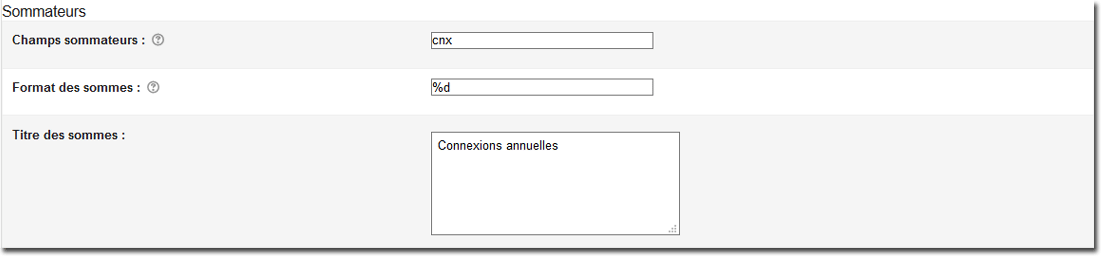
Summer fields
Defines the query output columns for which the sums of values will be given.
Sums format
These fields let you reformat the output data according to masks compatible with the “sprintf” function.
Sums title
This field lets you rename the labels displayed to introduce the summers' values.
Notes
A development roadmap entry to offer the “OR” combination is possible. This notably concerns queries containing aggregates of the COUNT(*) type or similar.
Credits
- Valéry Frémaux (valery@activeprolearn.com)- Development and documentation
- Florence Labord (florence@activeprolearn.com) - documentation
Back to the configuration guide index - Back to the component index - Go to the generic query catalog - Back to the plugin index - Back to the catalog