Table des matières
Essential FEL theme
The Essential FEL theme is derived from the very popular Essential theme (between Moodle 2.4 and Moodle 2.8). It keeps the flexible and advanced front page features (marketing announcements, slider, etc.) and includes significant modifications of some “renderers”, i.e. modifications that strongly impact the rendering for an improved user experience.
Guides to the specific features
- Rights-controlled custom menu
- 6 marketing spots
- Integration of performance stats (for the admin)
- Integrated user equipment “User Equipment”
- Customisable illustrations of activities and resources
Access to the user guides
Rights-controlled custom menu
The custom menu is a global menu whose structure is controlled by the “custommenu” setting in the theme's general settings. The modification consists in offering a simple syntax to control whether menu items are visible according to the user's situation:
<Label>|<url>
Standard case, visible to everyone
<Label>|!<url>
Only visible to logged-in users
<Label>|0!<url>
Only visible to users who are not logged in
<Label>|m!<url>
Only visible on mobile devices
<Label>|0m!<url>
Only visible on mobile devices when not logged in
<Label>|xs!<url>
Only visible at reduced screen widths
<Label>|capability!<url>
Only visible to those who have the capability (tested in the system context or in the current course context). In this case super-users always pass.
<Label>|capability^!<url>
Only visible to those who have the capability (tested in the system context or in the current course context) explicitly. Super-users do not see it unless they have an explicit capability themselves.
<Label>|user:<fieldname><op><value>!<url>
Only visible to those whose user profile field “fieldname”:
- If “op” is = : equals the value
- If “op” is ~ : contains the value
The fieldname field can take any field name of the basic user profile, or point to a Moodle custom profile field, in which case it must be 'profile_field_' followed by the short name of the custom field.
Example:
Teacher tools|user:profile_field_teacher=1!/local/my/index_teachers.php
Variable replacement
In addition, the menu implementation injects some parameters typical of the current environment:
- %COURSEID%: The Moodle id of the current course
- %WWWROOT%: The Moodle web root. This lets you use absolute URLs that do not depend on the installation.
- %USERID%: The Moodle numeric id of the current user.
Examples
Here are some typical implementation examples:
Example of a logged-in/logged-out switch
Logout|!/login/logout.php
Login|0!/login
Logged-out users only see the 'Login' link. Logged-in users only see the 'Logout' link.
Example of capability control
Administration|local/adminsettings:nobody!/admin/index.php
Administration|moodle/site:config^!/local/admin/delegatedadmin.php
Only administrators holding the local/adminsettings:nobody capability, including through a super-administrator right, can see the admin/index.php menu (the standard full administration console)
Example for restricting to the editing teachers of the current course only:
Library|moodle/course:manageactivities!%WWWROOT%/local/sharedresources/explore.php?id=%COURSEID%
Users having the moodle/site:config capability through an explicit role assignment can reach the delegated (simplified) administration panel. Super-users (site administrators) with no other explicit role assignments do not see this menu.
Example of capability control with parameter passing
Library|repository/sharedresources:view!/local/sharedresources/index.php?course=%COURSEID%
Users having the required capability (see the library) can see this link button to the shared library home. The numeric id of the current course is passed to the library as the current usage context.
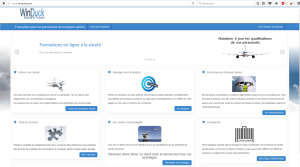
Marketing spots
Technical sheet
- Component type: Theme
- Name: Essential FEL
- Technical name: theme_essential_fel
- Supported versions:
 to

- Distribution: Unpublished
- Availability: Open source for referenced customers.
Builds
Note: a “Failing” status does not necessarily mean that the plugin does not work. This status reflects the result of automated tests checking the code against Moodle's strict standards. We are continuously working on bringing all supported plugins progressively into compliance with these development rules.
| Branch | Continuous integration tests |
|---|---|
| 405 |

|
| 501 |

|
Credits
- Valéry Frémaux (valery@activeprolearn.com) - Development and tests
- Florence Labord (florence@activeprolearn.com): Documentation
Back to plugins index - Back to catalogue index