Table des matières

User guide Local OIDC Server
Configuration
This plugin has a few central configuration settings, available through the menu:
Site administration > Plugins > Local plugins > OAuth/OpenID server
- Active/inactive: Enables or disables all the answers of the server endpoints, for all clients.
- Key encryption algorithm: RSA or HMAC are supported. Default: RSA (RS256)
- Private key: Lets the server encrypt the tokens. This key must not be shared with third parties.
- Public key: Lets encrypted tokens be decoded. This key is given to third-party clients that must decode the information held in the exchanges between the OIDC server and the client.
- Ask for consent on data transmission: If enabled, an additional step in the authentication procedure asks once for consent on data transport.
- Force CORS opening: If active, the Access-Control-Allow-Origin policy will be relaxed for the whole platform. Third-party sites will be free to embed Moodle URLs.
PRO version settings
You must first register your licence key.
- Client key size: Default: 13. This setting determines the size of the keys that Moodle will generate for OAuth2 clients.
- Enable single-logout. Default: Yes. By enabling this option, the OIDC server embedded in Moodle sends a logout request to all active clients tied to the user account. The Moodle client must support a logout request URI, and accept the oidc token as reference.
- Enable user filtering: Default: Yes. By enabling this option, an authorization request will only be granted if the target user is among the allowed users. Filters can be configured per client in the client configuration.
Client management
Register a client
To interact with Moodle as an identity provider, the remote client must be registered so that the server can issue it authorizations to access profile data.
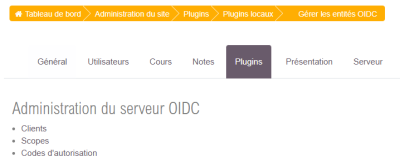
The entry point for client management is in Moodle's central administration, under:
Plugins > Local plugins > Manage OIDC entities
This link completes the central configuration of the plugin, after the “OAuth/OIDC Server” entry in the same section.
Clients
On the management page offered, click the “Clients” link.
- Identifier:
- Secret:
- Name:
- OAuth return URI: Address where the user will be sent to process the OAuth exchanges
- Alternative redirect URIs: Alternative address to process the OAuth exchanges
- Logout URI: URI of the client able to close the user's session
- Allowed users: Filters local users following a REGEXP rule. Give a prefix when MoodleScripts are used.
Scope
Attributes sent to the server with a translation function depending on the client
- Identifier:
- Name:
- Default associated local info: