Table des matières
Dashboard Block
File Output Configuration
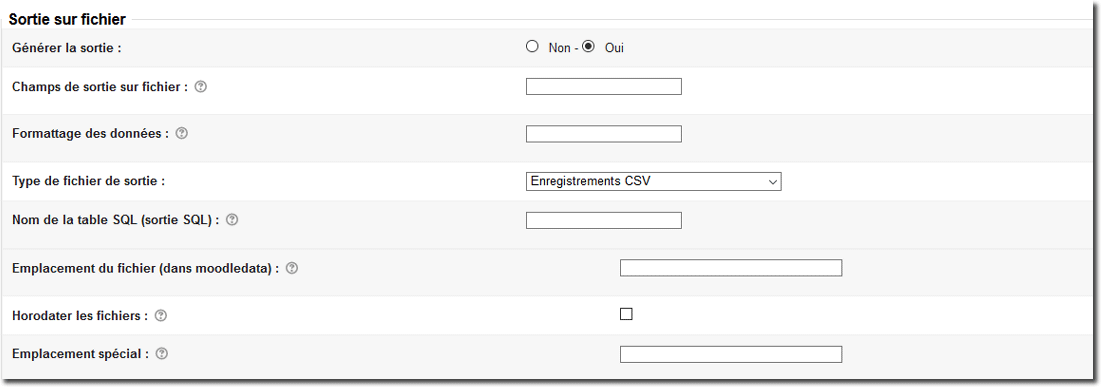
- Generate output: No / Yes
- File output fields: The file output can be fed with fields other than those used for display.
- Data formatting: These fields let you reformat the output data according to masks compatible with the “sprintf” function. For a list of reference fields, the format list must contain the same number of formatting expressions separated by semicolons. An empty expression means “no formatting”.
Learn more about formatted strings
- Output file type: CSV record / CSV record without header line / SQL INSERT statement
- SQL table name (SQL output): If you choose to output SQL statements, you must specify the target table name for the insertions.
- File location (in moodledata): Data can be generated from a scheduled refresh (deferred refresh). This setting determines the path within the course files where the file will be generated.
 Warning: This path must exist in the course files. The generator will not create the directory if it does not exist.
- Timestamp files: If enabled, each generated file will be completed with a timestamp.
- Special location: Administrators may need to generate output files in paths that are not controlled by Moodle.
Credits
- Valéry Frémaux (valery@activeprolearn.com)- Development and documentation
- Florence Labord (florence@activeprolearn.com) - documentation
Back to the configuration guide index - Back to the component index - Go to the generic query catalog - Back to the plugin index - Back to the catalog