Table des matières

Course Ascendants Block (My training plan): Operational Guide
The curriculum
A curriculum is a Moodle course in which a Course Ascendants block is placed. This curriculum is a full workspace in its own right.
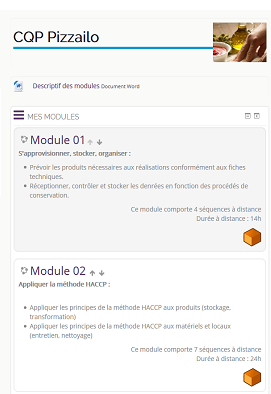
In the illustration you can see two modules pointed to by the Course Ascendants block in the CQP pizzailo curriculum. Note: the orange block (not started/not visited) has been replaced by blue
The curriculum can be used as a “general space” for the whole training plan and offer activities that are common to all the modules making up the curriculum.
Example: The “training news” forum advantageously lives in this curriculum, even if some modules might broadcast more “local” news on a given subject.
 It is therefore the Course Ascendants block that ensures propagation of course enrolments to the various modules or teaching units.
The training module
A training module or teaching unit is a course located in a category or subcategory pointed to by the Course Ascendants block of a “curriculum course”. This course will become a metacourse ONLY IF it is activated in the training plan.
Sensitivity to course completion
If you want to restrict access to the various modules making up your pathway, you should implement course completion in the settings of the module course concerned - Course settings/edit course completion rules.
In practice, access to the next module will not be possible until the completion conditions are met.
The training plan
The training plan is implicitly the set of modules activated in the Course Ascendants block.
The "Curriculum group"
Connecting a course/module to a course/curriculum can be accompanied by the automatic creation of a “course group” in the module to represent the students enrolled through the course/curriculum. This feature can be useful if you use the same “course/module” in several curricula, and want to be able to segment the student populations coming from these curricula without having to manage the grouping manually.
Credits
- Valéry Frémaux (valery@activeprolearn.com) - Development and documentation
- Florence Labord (florence@activeprolearn.com) Functional tests and documentation
Back to the user guide index - Read the pedagogical guide - Back to the component index- Back to the plugin index - Back to the catalog