Table des matières

NetYpareo authentication: Technical guide
Field mapping
| NetYpareo | Moodle |
|---|---|
| netypareo_usertype | NetYpareo user type (Teacher, Trainer, Company tutor, etc.) |
| netypareo_overage | Adult or minor |
| netypareo_status | Value such as apprentice, professional contract, inter-region, seasonal, spouse, free auditor, etc. |
| netypareo_cursus | NetYpareo curriculum (BTS1 for example) |
| netypareo_program | Training (NetYpareo programme) |
| netypareo_program_step | Year in the curriculum or vintage |
auth netYpareo and profile fields
static_profile_field_netypareo_usertype
In the CSVs you can inject usertype values of your choice
Profile fields User type: netypareo_usertype
Trainers profile-usertype _teacher in the CSVs when they come from no NetYpareo source and are trainers
we will get in the list of possible messages 0teacher: 0_ for those of 34 1teacher: 1_ for those of Toulouse
In the identification profiles 0 34 1 Toulouse 2 Aude/PO 3 Gard/Lozère
Capabilities
auth/netypareo:sync
Users with this capability can manually synchronise the NetYParéo™ entities.
Scheduled tasks settings
Path: server/scheduled tasks
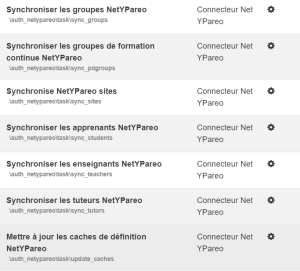
Click the gear wheel next to one of the tasks to schedule and fill in the desired values
Example for days:
- * : Every day
- */2 : Every 2 days
- 1 : The first day of each month
- *1,15 : The 1st and the 15th of the month
Example for days of the week:
- * Every day
- 0 : Every Sunday
- 1 : Every Monday
- 2,5 : Every Tuesday and Friday
Example for hours:
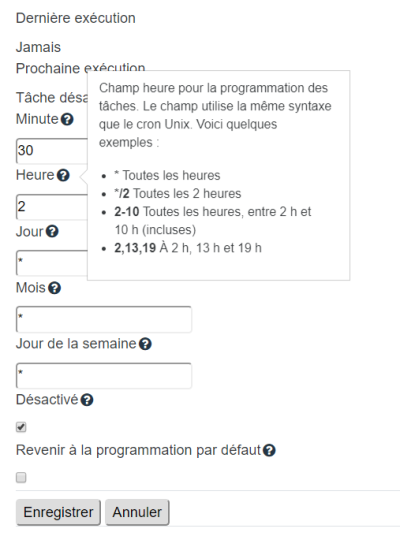
- If the disabled box is checked, the scheduling will be run through a CLI script
Preventing 502 errors on Ypareo Web Services calls
All situations involving the Ypareo Web Services (authentication validation, data synchronisation) can lead to 502 errors and segmentation faults of the PHP engine (code 11). The Ypareo Web Services use the SOAP protocol, which can be greedy in buffering resources.
PHP server side optimisation
- output_buffering: raise from 4096 (default value) to 9192
You should generally raise the value of the output_buffering parameter in php.ini. The default value is 4096. Convincing results were observed with a value of 9192.
Credits
- Valéry Frémaux (valery@activeprolearn.com) Development
- Florence Labord (florence@activeprolearn.com) Documentation
Back to the component index - Back to plugins index - Back to catalogue