
Table des matières

Tool Sync: User operations
Introduction
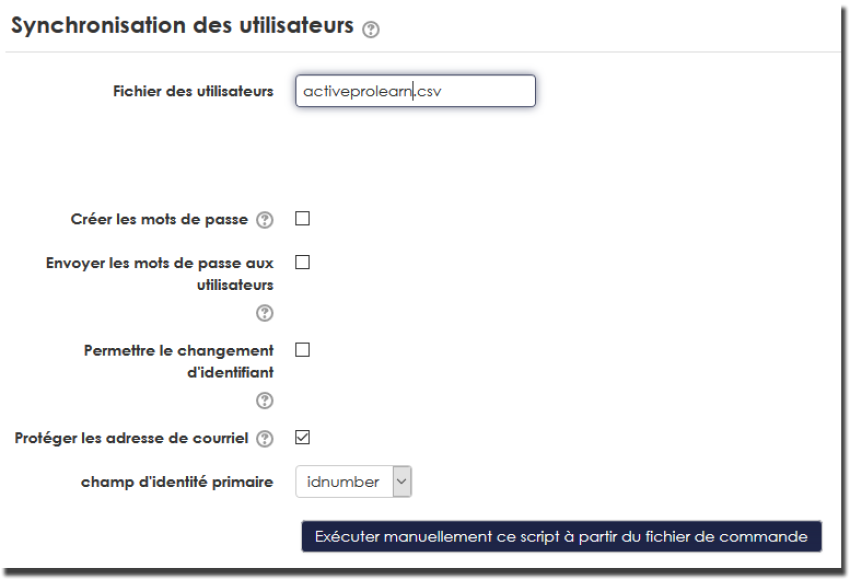
Via this interface you can:
- Define the standard user feed file
- Choose whether to notify created users to send them their password
- Choose the primary identifier field
- Launch a manual import from a file you have locally
Access
Site admin/feeding and automation/Course and user synchronisation by CSV files
Details
Define the standard feed file
This file is imported automatically and regularly if you have enabled the scheduled CSV user synchronisation task. If you opt for archiving/deleting command files, the scheduled task will react if it finds a file of this name in the command file manager. Otherwise it will skip processing.
You can feed this file into the <moodledata>/sync directory from outside. It will then be automatically picked up in the command file manager and executed by the automatic task.
This parameter must mention the relative path of the file in the command file manager.
Choose whether to send the password to users
In Moodle, if your file does not contain passwords, Moodle will systematically issue a password notification to users. This is indeed their only way of learning their password, because even the administrator cannot access the “source” word of the generated password.
However, if your file expresses the passwords (generated elsewhere), you can choose whether or not to send this notification. Uncheck this box if you use another procedure external to Moodle to distribute your passwords.
Choose the primary identifier field
This selector defines which identifier field will be used to match identities in your import file.
Launch a manual import
If you want to import a user file immediately and interactively, enable this tool. You can also enable it to immediately play the file referenced above.
In this case, execution is interactive and the report is generated on screen.
It is possible to launch a “simulated” execution of your file.
Back to the user guide index - Back to the component index - Back to the catalogue