
Ceci est une ancienne révision du document !
Table des matières

SharedResources Block User Guide
Introduction
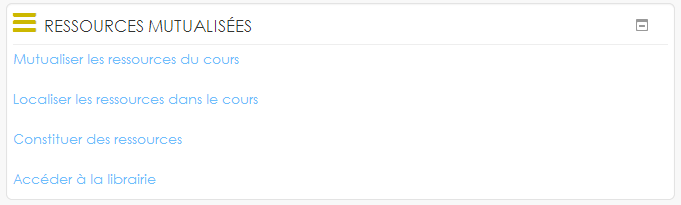
This block is a facilitator displaying links to simplified commands to move backand forth resources in/from the shared library.
Features
Sharing the course local resources:
Allows you to “push” to the shared library all the local resources of the course (local mod/resource activites) in one go by entering the minimal set of meta data: Title, description and Keywords.
Locate shared resources back in course:
Allows you to do the reverse operation: Convert a shared resource, present in the library, into a local course resource, so that it is recorded as a “course” resource.
The common use case of using this command is when a course needs to be backup to export to another moodle, probably not having the Sharedresources subsysem installed. In that case should be all mod/sharedresource activity modules relocalized to standard course resources.
Note: Go through the link “Access the library” then follow the link “Convert a resource” does the same.
Build resources from files:
Allows you to add resources to the library from your files on your desktop. Then you just have to fill in title description keywords.
Check the add to course check box to see resources in the “add an existing resource” drop-down list and be able to add it to the course if you have the flexipage course mode.
Access the library:
This link is a shortcut of the menu that you will find in the course administration allows teachers to access the common library, add resources and document them according to the chosen referenced scheme.
This is the equivalent of the link:
https://YOURMOODLESITE/local/sharedresources/index.php?course=<COURSEID>