Table des matières

Tool sync: Avatar file control
Introduction
Via this interface, you can:
- Define the search prefix of avatar archives
- Define the primary matching identifier
- Choose the avatar overwrite mode
- Choose the avatar file cleanup option
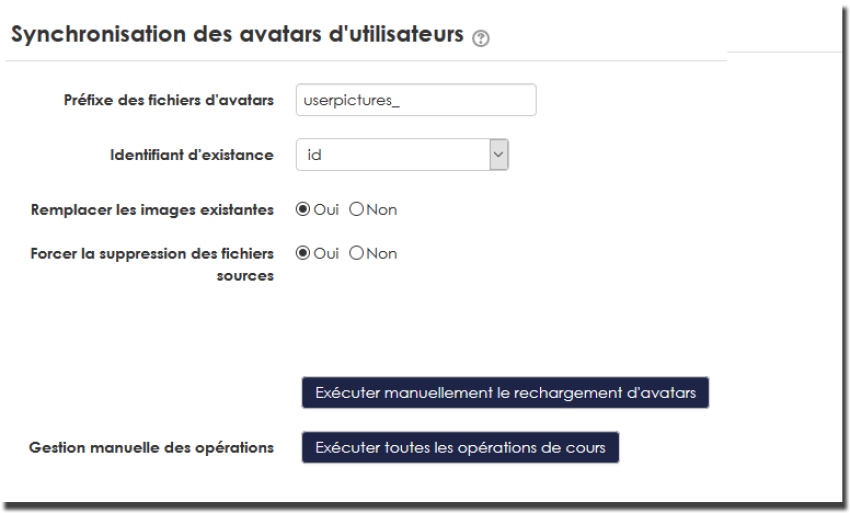
Details
Define the archive search prefix
An avatar archive is a .zip file containing only, at the first level, the image files (.png or .jpg) of user avatars. As this file may be quite large, you can split it into several smaller archives for upload. In this case, make sure that the names of all your partial files start with the prefix defined in this parameter.
Files will be found in the command file manager and executed one after the other in the alphabetical order of their names.
Define the primary matching identifier
The primary matching identifier determines the name to give to the image files contained in the archive .zip. If for example you choose 'username', then your images must be named <username>.png in the archive.
Choose the avatar overwrite mode
You can choose here the behaviour of the import if images already exist in Moodle for users. You can:
- Request systematic replacement by the new images
- Ignore users who already have an image, preserving it. Only new images will be added.
Choose the avatar file cleanup option
If this option is active, avatar files are destroyed after the images are integrated. This is the recommended mode when avatar synchronisation is entrusted to an automatic Moodle task.
External feeding of avatar files
As with the other tools you can organise a regular automated drop of avatar archives into the <moodledata>/sync directory. These files will be automatically picked up by Moodle, integrated into the command file manager, then processed when the automatic task runs.
Back to the user guide index - Back to the component index - Back to the catalogue