Table des matières

Tool Sync: Course operations
Introduction
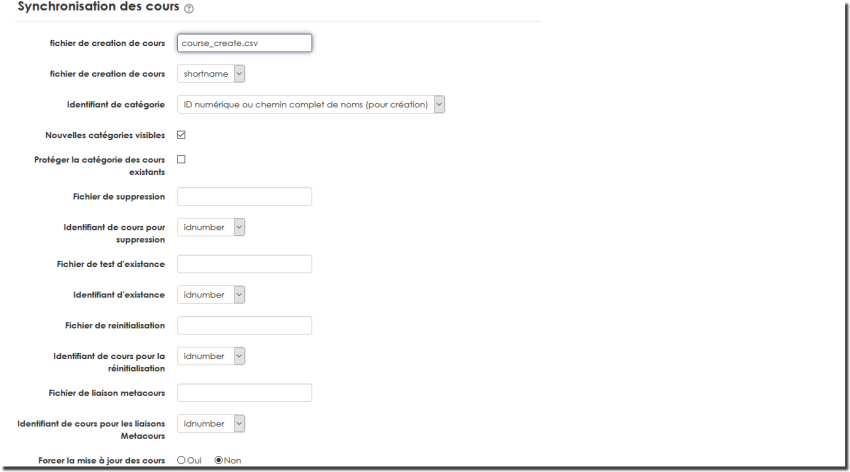
Via the tools on this screen you can:
- Define the standard course creation file
- Define the standard course deletion file
- Choose the reference identifier for the courses to delete
- Define the standard course existence test file
- Choose the reference identifier of courses for the existence test
- Define the standard course reset file
- Choose the reference identifier for the courses to reset
- Choose the behaviour of the creation function when the course exists.
Utilities
Introduction
This set of utilities lets you:
- Create a course deletion file
- Create a course reset file
- Test the existence of courses
- Clean up empty course categories
Create a course deletion file
This tool can be useful in the following cases:
- You have many courses
- You have no reference tool formally managing the list of Moodle courses
- You do not permanently maintain a formal course index
This tool lets you generate a “well-formed” deletion command file from the course offering found in Moodle itself. You will be able to make a selection among all available courses and automatically generate the deletion file in the command file manager.
You can of course rework this file manually afterwards, provided you keep the expected format.
Create a course reset file
The course reset file format is rich in reset options and sub-commands. It may not be convenient to write it by hand, especially to reset a large number of units.
This tool lets you generate a first version of the reset file with the most common “standard” options. This file is generated in the command file manager and can be refined afterwards.
Test the existence of courses
If you maintain an external course index (in an ERP or external indexes), it may be useful for you to make sure that all referenced courses actually exist in Moodle.
This tool lets you automate a global existence test based on a list of expected identifiers.
Clean up an empty course category
This tool lets you automate the deletion of course categories containing no courses.

Manual management of operations
Introduction
This set of utilities lets you:
- Reset courses
- Manually execute course creation
- Manually execute a course deletion
- Manually set up metacourse relations
- Manually clean up empty categories
- Execute all course operations

Back to the user guide index - Back to the component index - Back to the catalogue