Table des matières
~~META: title = ACTIVEPROLEARN - Moodle Documentation - Feeding cohorts &creator = Valery Fremaux - Florence Labord &keywords = Moodle, Plugins, Administration ~~

Tool sync: Scheduling cohort operations
Introduction
This interface lets you feed cohorts from text files. On this screen you can:
- Designate the standard file to be processed by the automatic task
- Choose the reference identifier of users
- Choose the reference identifier of cohorts
- Request the immediate interactive execution of a cohort file
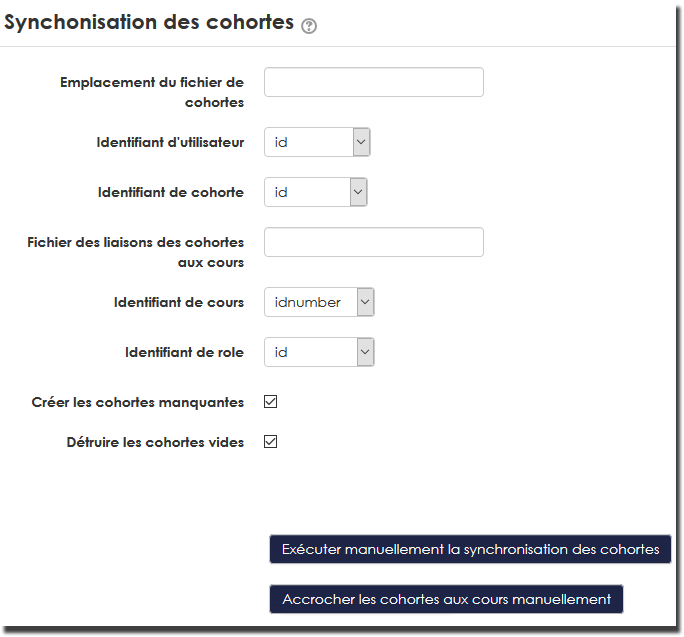
Details
Cohort file location
Lets you designate the standard cohort import file. This file is imported automatically and regularly if you have enabled the scheduled CSV cohort synchronisation task. If you opt for archiving/deleting command files, the scheduled task will react if it finds a file of this name in the command file manager. Otherwise it will skip processing.
You can feed this file into the <moodledata>/sync directory from outside. It will then be automatically picked up in the command file manager and executed by the automatic task.
This parameter must mention the relative path of the file in the command file manager.
User identifier
The identity match with the Moodle users to add to cohorts will be done on this attribute. Your CSV file must therefore provide values matching this choice. You can choose between:
- The numeric Moodle id in the database (not recommended)
- the external identification number (IDNumber, recommended)
- the login identifier (username)
- the email address used for the account
Cohort identifier
The match with cohorts will be done on this field. Your CSV file must provide values matching this choice. You can choose:
- the numeric Moodle id of the cohort in the database (not recommended)
- The external identification number (IDNumber) of the cohort
- The name of the cohort
Cohort-to-course link file
This parameter lets you designate a file that will contain the data associating cohorts with courses. This tool will add “cohort sync” enrolment methods for each course/cohort pair given in the file. The scheduled enrolment instances will assign the role predefined by the added enrolment method, according to the result of the roleid column.
Course identifier
The match with courses will be done on this field. Your CSV file must provide values matching this choice. You can choose:
- the numeric Moodle id of the course in the database (not recommended)
- The short name (shortname) of the course
- The external identification number (IDNumber) of the course
Role identifier
The match with the role will be done on this field. Your CSV file must provide values matching this choice. You can choose:
- the numeric Moodle id of the role in the database (not recommended)
- The short name (shortname) of the role
Create missing cohorts
If this box is checked, missing cohorts will be created.
Delete empty cohorts
If this box is checked, cohorts empty of users will be deleted.
Immediate manual execution of the cohort import
With this button you can, in a single operation, load and execute a cohort building file, or interactively execute the standard cohort command file. The execution report is then displayed directly on screen. Here you can also opt for a “simulated” execution of the import.
Attach cohorts to courses manually
With this button you can interactively execute the cohort-to-course link file, or execute an ad hoc file that you upload.
Back to the user guide index - Back to the component index - Back to the catalogue